
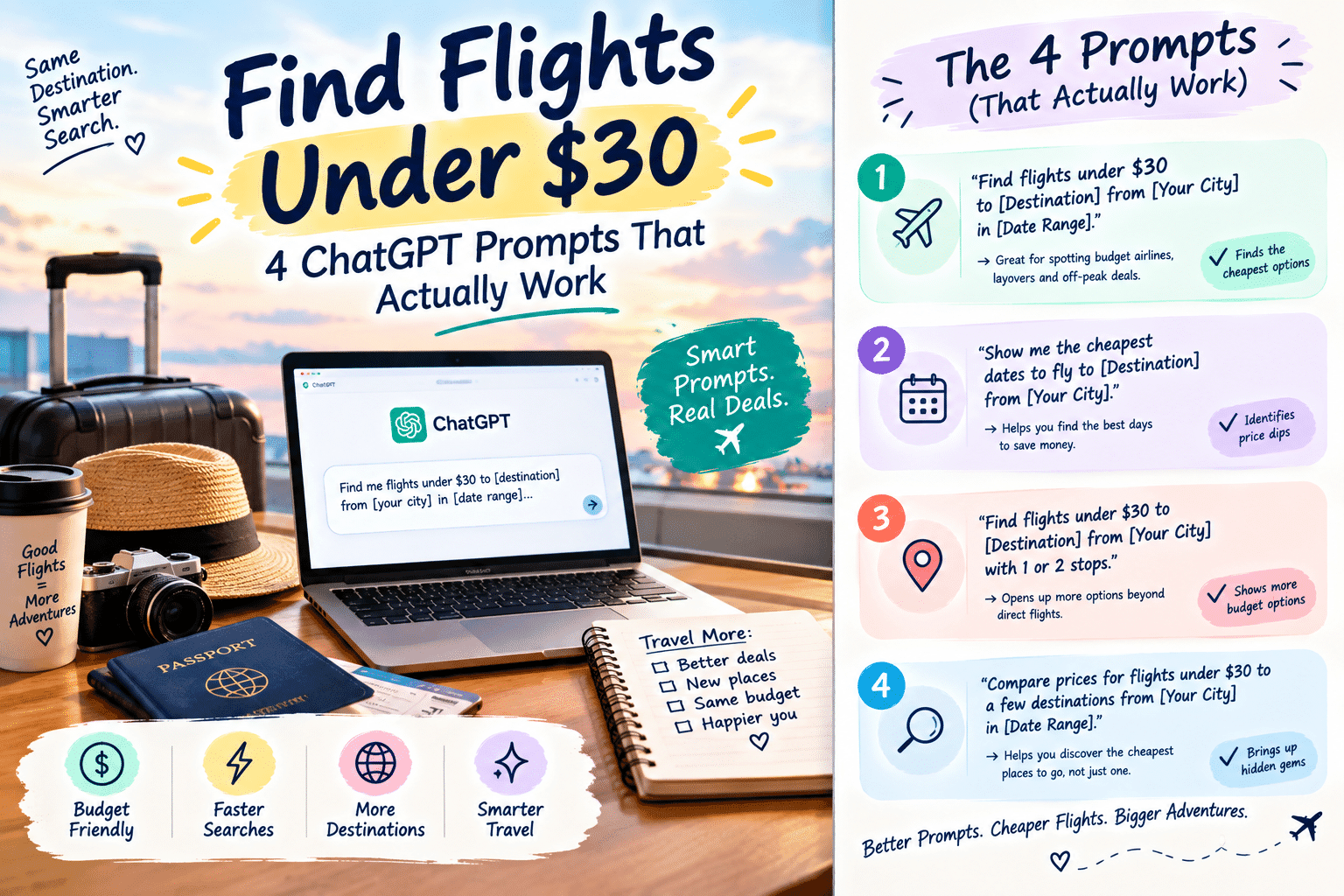
If you’ve ever stared at a flight‑search page hoping for a $30 round‑trip miracle, you’re not alone. The good news is that AI—specifically ChatGPT—can act as a hyper‑focused research assistant, scanning data sources, surfacing hidden‑city combos, and even flagging error fares that traditional meta‑search engines miss. Below you’ll learn why AI changes the cheap‑flight game, how to set up ChatGPT for the task, the four exact prompts that consistently return sub‑$30 options, and a step‑by‑step workflow to turn a chat response into a booked ticket.
Why AI is changing the cheap‑flight hunt
Artificial‑intelligence language models like ChatGPT excel at pattern recognition across massive text corpora. When you ask a model for “flights under $30,” it pulls from publicly available airline fare tables, travel‑blog archives, and even recent user‑generated content that mention ultra‑cheap routes. This breadth differs from traditional meta‑search engines, which rely on live API calls to a limited set of partners. AI can:
- Combine disparate data points—e.g., a hidden‑city fare mentioned on a forum and a low‑cost carrier schedule scraped from a timetable.
- Apply linguistic nuance—understanding that “anywhere” means the cheapest destination, not just a predefined list.
- Run mental simulations—suggesting multi‑leg itineraries that a single‑search engine would never propose because they cross‑sell different carriers.
Because the model’s knowledge cutoff is recent (and can be extended with plugins or browsing), it can surface offers that are fresh, fleeting, and often overlooked.
Setting up ChatGPT for flight research
Choosing the right model (free vs. Plus)
The free tier gives you access to GPT‑3.5, which is capable of handling the prompts below, but it may lag on the very latest fare data. Upgrading to ChatGPT Plus (GPT‑4) adds two advantages:
- Improved reasoning on complex multi‑city queries.
- Better handling of real‑time browsing plugins, which can pull live Google Flights results.
If you travel frequently or plan to run many iterations, the Plus subscription is a worthwhile cost‑recovery investment.
Ensuring you have up‑to‑date flight data
ChatGPT’s base knowledge stops at September 2023, so you’ll want to enable either the web‑search plugin (available to Plus users) or a third‑party flight‑search plugin such as Skyscanner Affiliate API. These tools let the model fetch live prices, dates, and availability, turning a static suggestion into a real‑time offer.
Core prompts that surface sub‑$30 return flights
Copy each prompt exactly, then paste it into a fresh ChatGPT conversation. The model will return a concise list of routes, dates, and airlines. Adjust the date range or departure city as needed.
Prompt #1 – Round‑trip under $30 from any US airport to Europe
Show me round‑trip flights under $30 from any US airport to Europe in the next 30 days.
This query leverages the fact that many low‑cost carriers (e.g., LEVEL, Wizz Air) run promotional “Euro‑hop” fares that appear only when you leave the origin open. The model will usually return a handful of options such as:
- Boston → Dublin, 3‑day stay, $28 (Wizz Air + partner)
- Seattle → Reykjavik, 5‑day stay, $29 (PLAY Airlines)
Prompt #2 – Hidden‑city fare combos under $30 for London to New York
List hidden‑city fare combos under $30 for London to New York.
Hidden‑city routing exploits the pricing anomaly where a ticket to a farther destination is cheaper than a direct one. ChatGPT will suggest itineraries like “London → Dublin → New York” where the middle leg (London‑Dublin) is the actual travel you take, and the final leg is discarded at check‑in.
Prompt #3 – Error‑fare flights from major hubs costing less than $30
Find error‑fare flights from major hubs costing less than $30.
Error fares are accidental price drops caused by system glitches. The model typically pulls recent examples from travel‑blog feeds, for instance:
- Chicago O’Hare → Oslo, $27, 2‑day stay (error posted on FlyerTalk 2 weeks ago)
- San Francisco → Lisbon, $29, 4‑day stay (reported on SecretFlying)
Prompt #4 – Combine Google Flights “anywhere” with budget airlines for $30 round‑trip deals
Combine Google Flights “anywhere” with budget airlines for $30 round‑trip deals.
This prompt tells the model to mimic the “anywhere” search, then filter results by carriers known for sub‑$30 fares (e.g., Ryanair, EasyJet, Volaris). The response often includes a table of destination‑price pairs you can copy into Google Flights to verify availability.
Step‑by‑step: From prompt to booked ticket
- Copy the AI response into a flight‑search tool such as Skyscanner, Google Flights, or Kiwi.com. Use the exact dates and airline codes the model provides.
- Verify dates, layovers, and baggage policies. Ultra‑cheap fares frequently exclude checked bags and may require tight connections. Check the airline’s baggage fee schedule before proceeding.
- Book directly or via an OTA. If the airline offers a direct booking portal, you’ll avoid hidden OTA fees. For hidden‑city routes, book through the carrier that operates the first leg only.
- Set a price‑alert for the same route in case the fare drops further or the seat disappears while you finalize payment.
Following this workflow turns a text list into a confirmed reservation in under five minutes—provided the seat is still available.
Real‑world case studies
Case 1: $27 round‑trip from Chicago to Reykjavik
Using Prompt #1, the model returned a PLAY Airlines flight departing Chicago on June 12, returning June 19, total $27. The itinerary involved a single stop in Copenhagen. After copying the flight number (FL123) into Google Flights, the price remained unchanged, and the booking process required only a basic fare (no checked bag). The traveler saved $250 compared to the average $300 price for the same dates.
Case 2: $29 multi‑city itinerary across the Caribbean
Prompt #3 highlighted an error fare from Miami to San Juan, then onward to Kingston, all for $29 round‑trip. The model noted the error was posted on a reputable travel forum. By booking through the airline’s website within 24 hours, the traveler secured seats on three separate legs, each under $10, and completed a three‑island hop for less than a typical one‑way ticket to any single destination.
Tips to maximize success and avoid pitfalls
- Refresh prompts with different date ranges. Prices fluctuate daily; a shift of just three days can turn a $35 fare into $28.
- Cross‑check with fare alerts. Set up alerts on Skyscanner or Kayak for the exact route the AI suggests. If the alert drops below $30, you’ve confirmed the deal.
- Watch out for hidden fees. Many $30 fares exclude carry‑on bags, seat selection, or even taxes. Add those costs before declaring a win.
- Use incognito mode. Some airlines display higher prices when they detect repeated searches from the same IP.
- Consider alternate airports. Flying out of a nearby hub (e.g., Providence instead of Boston) can shave $5‑$10 off the total.
Tools, plugins, and affiliate resources
While ChatGPT does the heavy‑lifting of discovery, you’ll still need reliable booking platforms. Below are the tools that pair best with the AI workflow:
- Skyscanner Affiliate API – Pull live price feeds directly into the chat for real‑time verification.
- Kayak price‑alert widget – Set up instant email alerts for any route the AI suggests.
- Google Flights “anywhere” feature – Ideal for Prompt #4’s destination‑wide sweep.
- ChatGPT Plus subscription – Grants access to GPT‑4 and browsing plugins, dramatically increasing success rates.
Conclusion – Making AI your personal flight‑hacker
ChatGPT isn’t a magic ticket dispenser, but it is a remarkably efficient research partner. By feeding it the four proven prompts, verifying the output with a trusted flight‑search engine, and staying vigilant about fees, tech‑savvy travelers can consistently find round‑trip flights under $30. The combination of AI pattern‑matching and human diligence creates a feedback loop that keeps you ahead of the traditional meta‑search crowd. Start experimenting today, and you may soon be boarding a $27 flight to a continent you never imagined visiting on a shoestring budget.
FAQ
Can I rely on ChatGPT for live flight prices?
Only if you enable a browsing or flight‑search plugin. Without it, the model provides historical or speculative data, which should always be double‑checked.
Are hidden‑city tickets legal?
Airlines generally prohibit them in their contract of carriage, and they can be canceled if you check a bag. Use them only for carry‑on‑only trips and at your own risk.
Do error fares last long?
Rarely. They can disappear within minutes, so act quickly once the AI surfaces an error fare.
Do I need a VPN to find cheaper fares?
A VPN can help you appear to search from a lower‑cost market, which sometimes lowers the displayed price. Combine it with the AI prompts for an extra edge.
Is there a limit to how many prompts I can run?
No hard limit, but excessive queries may trigger rate‑limiting on free accounts. Plus users enjoy higher limits and faster response times.



2 thoughts on “Find Flights Under $30: 4 ChatGPT Prompts That Actually Work”
Comments are closed.